Watch ASCII Star Wars in Windows XP, Vista, 7, 8 & 10

Every one of us has watched Star Wars on television, computer or in a theater. It is the same movie with aliens fighting each other for galaxies and such stuff. There is nothing new in it. But wait, have you watched an ASCII (American Standard Code for Information Interchange) version of Star Wars and that too in Windows using telnet? A network protocol known only to computer wizards. Well if you have not, then you must do it now!

There is a complete copy of Star Wars done entirely in ASCII characters that you can watch in the Windowsoperating system (or any OS that supports telnet). The only thing required to watch it is an internet connection; speed does not matter.
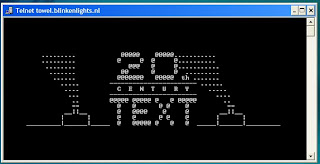
A Picture showing Star Wars in command prompt

To watch it on Windows XP, Mac OS X and Linux
  1. Go to Start, Run. (Only for Windows users)
  2. Now type "telnet towel.blinkenlights.nl" without the quotes and press Enter. Users of Mac OS X and Linux can directly execute this code in the terminal window.

On Windows 10, Windows 8, Windows 8.1, Windows 7 and Windows Vista

Telnet is turned off by default in the latest versions of Windows. So, in order to watch star wars, you must first enable telnet by going to Control Panel › Programs › Turn Windows Feature On or Off and ticking both the telnet check boxes. After doing that, follow the steps given below:-
  1. Go to Start, Search in Windows Vista and Windows 7 and Windows 10. On Windows 8 and Windows 8.1, open the main Start page.
  2. Type telnet and press Enter.
  3. In the following command prompt window, type "o" without quotes and press Enter.
  4. Now type "towel.blinkenlights.nl" without the quotes and press Enter.
If you do not need telnet anymore, you can turn it off.

A command prompt window like the one in the image will open with the movie being played in it. See the movie yourself. Did you enjoy watching this new version of Star Wars? Well, I did and know it for sure that you would have too.
cmd tricks

Command Prompt is one of the most powerful tools in Windows; but sadly, it is also the most ignored one. Things were not always like this; but with the advent of GUI based operating systems, people started feeling that computing through command based tools was boring. This ultimately led the command prompt into obscurity. 

However, the command prompt is not useless. In fact, it can be pretty useful. This article provides some excellent tricks, secrets and hacks that will make you realize that the Windows Command Prompt is not only useful but also a tool that you should definitely give more respect to.

Ascii star wars command prompt
1-Watch ASCII version of the Star Wars Episode IV movie
Surprised yet? You can watch an ASCII version of the full Star Wars Episode IV Movie right in your command prompt window. Just open command prompt, type a small code and the movie will start playing immediately. Read the complete instructions here. 

2- Create Matrix falling code effect
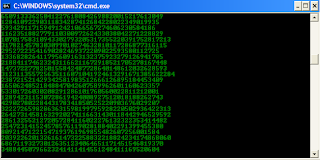
Have you watched “The Matrix”? Of course, you have. Then, you already know what I am talking about. In case you still don't know what I mean, take a look at this image! You can create the same effect in command prompt using just a few lines of code. Head over to this post for instructions.

command prompt tricks

3- Make Folders that you cannot delete
Are you tired of accidentally deleting important folders? Well, if you are, you can learn how to make undeletable folders here.

4- Shutdown your computer giving a funny reason
What if your computer shuts down saying that it is tired and doesn't want to work anymore? It would be fun, wouldn't it? You can do so by reading the instructions here.

5- Know your IP address, DNS Server's address and a lot more about your Internet Connection
Command Prompt can even let you know your IP address. Just type ipconfig/ all in the command prompt and press Enter. Along with your IP address and DNS servers, command prompt will also return a ton of information like your host name, primary DNS suffix, node type, whether IP Routing ,Wins Proxy, and DHCP are enabled, your network adapter's description, your physical (MAC) address etc . 

6- Know if your neighbours are stealing your WiFi connection
command prompt codes
Command Prompt can let you know if someone is connected to your Local Area Connection and using it. Just follow the steps:- 
1) Open your browser and visit http://192.168.1.1 or http://192.168.0.1 depending on your router. 
2) Find the tab that mentions “Attached Devices” or something similar.
3) Find the computer name, IP address and MAC Address (sometimes called Physical Address or Hardware Address) of your computer using the previous trick.
4 )Compare it with those displayed by your router in Step 2. If you notice some strange devices, then your neighbour has been sneaking in on your internet connection and it is best to add a password.

7- Know if someone is hacking your computer/ Trace a Hacker
Command Prompt hacks
Want to know if someone is hacking your computer? Command Prompt can help you find if someone you don't know is connected to your computer stealing private data. Just execute netstat -a and the command prompt will return a list of computers that your computer is connected to. In the results returned, Proto column gives the type of data transmission taking place (TCP or UDP) , Local address column gives the port with which your computer is connected to an external computer and the Foreign Address column gives the external computer you are connected to along with the port being used for the connection. State gives the state of the connection (whether a connection is actually established, or waiting for transmission or is “Timed Out”).

These tricks work on Windows 10, Windows 8.1, Windows 8, Windows 7, Windows Vista, Windows XP and all previous versions of Windows.

notepad trick

Notepad, the text editor that comes bundled in Windows is an excellent tool for text editing. But that is not the only thing for which notepad is famous. It is also famous for its tricks and hacks. Here is a roundup of some of the best and coolest tricks that you can try using Notepad.

Matrix Falling Code Effect - Notepad CMD (.BAT) Tricks

Inspired by the movie Matrix, this falling code trick is extremely popular on social networking websites. Copy and paste the code given below in Notepad and save the file as "Matrix.bat" or *.bat. 

@echo off
color 02
:tricks
echo %random%%random%%random%%random%%random%%random%%random%%random%
goto tricks

Notepad tricks
Matrix Falling Code Effect - Notepad Trick

Upon running the bat file, you will see the "Matrix falling code" effect.

Make Your Keyboard Type (Any) Message Continuously-VBS Trick

This VBS trick can make any of your friend's keyboard type any message continuously. Open Notepad, copy the code given below and save the file as Tricks.vbs or *.vbs. You will need to restart your computer to stop this. Try this after closing all important programs.

Set wshShell = wscript.CreateObject("WScript.Shell")
do
wscript.sleep 100
wshshell.sendkeys "This is a Virus. You have been infected."
loop
Send this file to your friends as an email attachment to see the fun.


Notepad Virus

Create a Harmless Funny Virus with Notepad-Continuously eject CD/DVD drives

This VBS trick will create a code which will continuously eject all your connected Optical drives. If you put them back in, it will pop them out again. Copy this code and paste it in Notepad as Virus.vbs or *.vbs.

Set oWMP = CreateObject("WMPlayer.OCX.7")
Set colCDROMs = oWMP.cdromCollection
do
if colCDROMs.Count >= 1 then
For i = 0 to colCDROMs.Count - 1
colCDROMs.Item(i).Eject
Next
For i = 0 to colCDROMs.Count - 1
colCDROMs.Item(i).Eject
Next
End If
wscript.sleep 5000
loop

Double click to open this file and you will be impressed by this awesome trick.

Make a Personal Diary(Log) with Notepad (Easter Eggs)

Notepad Diary
Notepad Diary
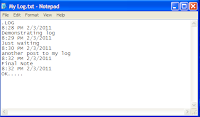
You can use this trick to create a personal log with Notepad which will automatically include the current date and time before your note. To do so, open Notepad and type .LOG in capital letters and press Enter. Save the file. Now, every time you open this file, notepad will automatically insert the current time and date before the note. Just enter your note and save the file each time after making an entry.

All these Notepad tricks are totally harmless and would not harm your PC in any way.  To close any of the VBS trick given, open task manager and close the wscript.exe process. These tricks work on Windows 10, Windows 8.1, Windows 8, Windows 7, Windows Vista and Windows XP.

12 Computer (PC) Tricks You Should Try Right Now

Computers have simplified our life to a great extent. Things that were impossible earlier can now be completed instantly thanks to computers. However, this does not mean that a PC is all work and no play.

Here are some of the best tricks you can try out on your Windows based computer.

Computer Tricks
  1. Have fun with Notepad
    If you think that Notepad is just a basic text editor, then, you will be amazed by its capabilities. You can use Notepad to create everything from personalized logs to harmless viruses that are incredibly annoying. Go see this post to know just how useful Notepad is.
  2. Command Prompt too has some tricks up its sleeves
    If you think that the Command prompt is a boring old program that no one uses, you are making a huge mistake. It can be used for everything from watching ASCII Star Wars to making folders that you cannot delete. See this post to know about all the cool stuff you can do with the Windows Command Prompt.
  3. Use Keyboard Shortcuts to get work done in no time
    If you are tired of having to alternate between your mouse and keyboard to operate your Windows computer, you would love to know these really useful keyboard shortcuts which greatly increase your speed and efficiency. See this post for details.
  4. Make your computer speak what you type
    You can use your PC's built in features and some VBScript magic to create a simple program that will make your computer speak whatever you input to it. Enter the right words and you could imitate a real conversation. Head over to this post to talk with your PC.
  5. Make your computer greet you every time you start Windows
    A simple modification in the previous trick will make your computer welcome you in its own mechanical voice every time you log onto Windows. This is achieved by placing the VBS script responsible for making your computer talk in the Start up folder. Read this post to have a computer said welcome.
  6. Find your computer's gender
    Want to know if your PC is a male or a female? Simple. Try the previous trick to know if your computer is a 'he' or a 'she'. On a serious note, this depends upon the voice you have selected in Microsoft Text to Speech options.
  7. Lock Folders with password
    If you have important personal files that you do not want other people to see, you can hide them in a password protected folder to prevent unwanted users from seeing them. Go see this post to hide your personal files effectively.
  8. Change your Processor's name
    PC Tricks
    If you are bored of your old processor and want a new one with a staggering name, you will definitely want to see this trick which allows you to change its name to something extraordinary to make your PC special.
  9. Make a Keyboard Disco
    You can use some VBScript coding to create a live disco on your keyboard by making the LED lights flash alternately. See this post to know how your keyboard can turn into a disco.
  10. Recover permanently deleted files in Windows
    If you have ever deleted a file in Windows that you did not want to and now want to recover it, you would definitely want to know about some free tools to recover your deleted fileseasily.
  11. Use your Keyboard as Mouse.
    You know you can use your mouse as keyboard using the On-screen keyboard utility. What if I tell you that it is also possible to do the reverse? Just read this post to see how.
  12. Disable USB ports to prevent others from taking your data
    Ever wanted to disable your USB ports to prevent others from using their flash drives on your PC? This post explains how to do just that with a simple registry trick. Do note that disabling USB ports will also disable your USB connected peripheral devices.

These tricks work on Windows 10, Windows 8.1, Windows 8, Windows 7, Windows Vista and Windows XP.

online earning in nepal


KOlotibablo.com   has been providing online jobs from home from last 5+ years & many of  the people have received their payment on time. They pay up to $1 or even more per 1000 captcha images typed.

KOlotibablo.com uses rating system to pay higher amount to their more efficient workers. More accuracy you show, more money you will receive. Initially, you need to work a little hard to earn money but with time, you will find a very profitable position on this website.
click here to earn now KOlotibablo.com

Computer hacks tricks

1. Automatic shout down trick:-
          
                                      a.Right click on desk top> select new>shortcut
                                      b.in the shortcut windows type :shutdown-s-t60-c
                                      c.select the next
                                      d.name it any thing  .Now ,double click  it'
                                       scared?? nothing happen !
                         
                                    1.go to start>run
                                    2.type:shutdown-a
                                    3.hit enter

2.Convey your friend a little message shut down his or her computer:-
   a.just copy the code on note pad
       
        msg*/don't like you
        shutdown-c"error!you are to stupid'-s
     
      b. save it as "anything.bat" and send it to your friend